ElderlyOS

Patient tech help, one step at a time

Artificial Assistance for the people you love.

ElderlyOS is a helper on your iPhone for the stuff nobody explains: the remote, the router, the settings menu, the panel on the wall at work. Talk to it like a phone call, show it with the camera, or type. It works out what you're looking at and walks you through it.

We built it for our grandparents. It turns out almost everybody has something they don't know how to use.

Give it as a gift ยท $30 a month or $325 a year

The real app, recorded in the iPhone simulator.

Watch it help

Pick a problem. Each one plays out the way a conversation with Genie goes, so you can see it before you download anything.

    This is an animation, not a recording. The real screens are below.

    The real thing

    These come straight from the app running in Apple's iPhone simulator, using the sample data we test with. No mockups.

    Sources firstBefore it writes a step, it shows the pages it found and how closely each one matches your model.
    One step at a timeBig type, one instruction per screen, and Genie says each step out loud.
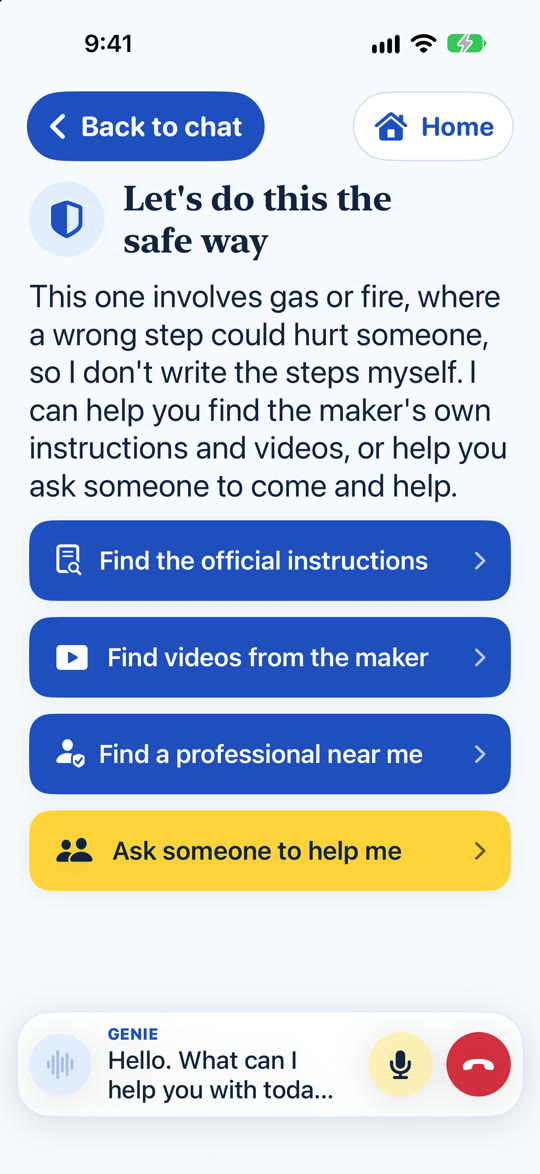
    Screen titled Let's do this the safe way, with buttons to find the official instructions, find videos from the maker, find a professional, or ask someone to help.
    The safe wayGas, fire, wiring, or medicine? It won't write steps. It finds the maker's instructions and helps you ask someone.
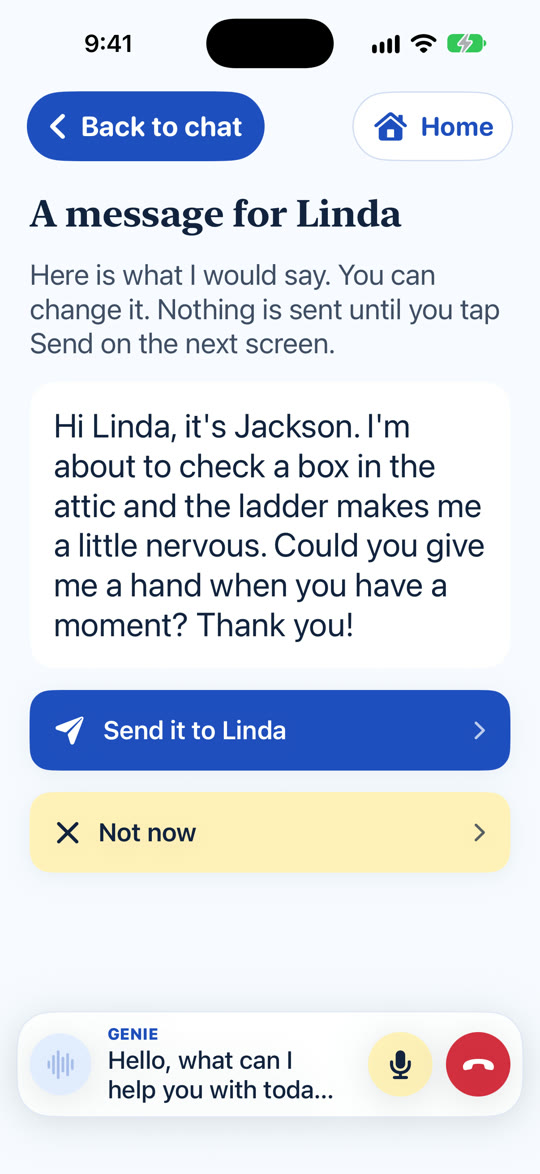
    Screen titled A message for Linda, with a drafted text asking for help with a ladder and a Send it to Linda button.
    Ask for helpIt writes the message for you. Nothing sends until you tap Send.
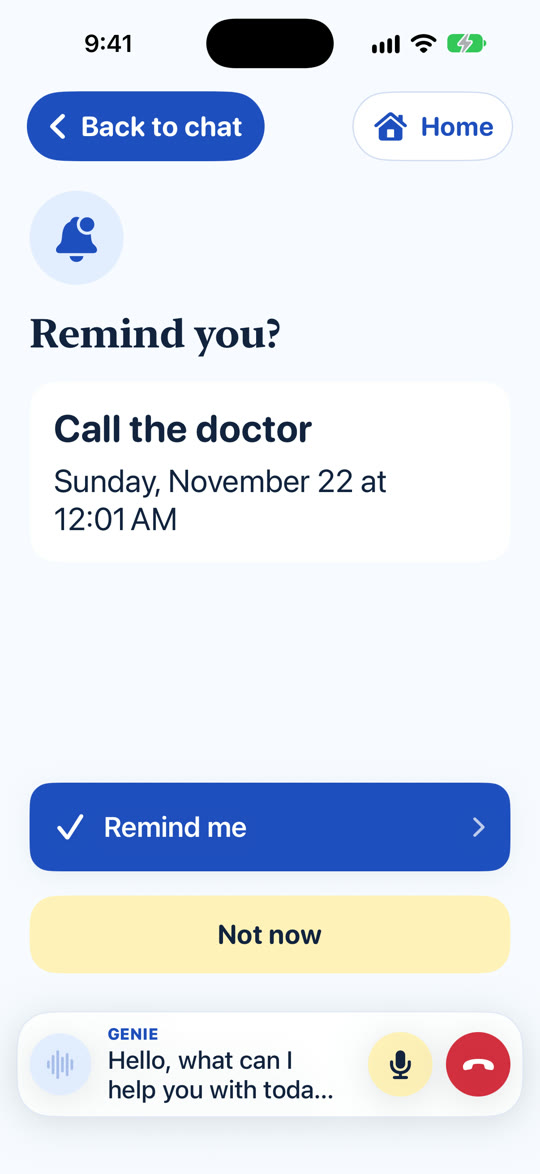
    Screen titled Remind you?, showing Call the doctor with a date and time and a Remind me button.
    RemindersSay "remind me to call the doctor" and it's on the calendar after one tap.
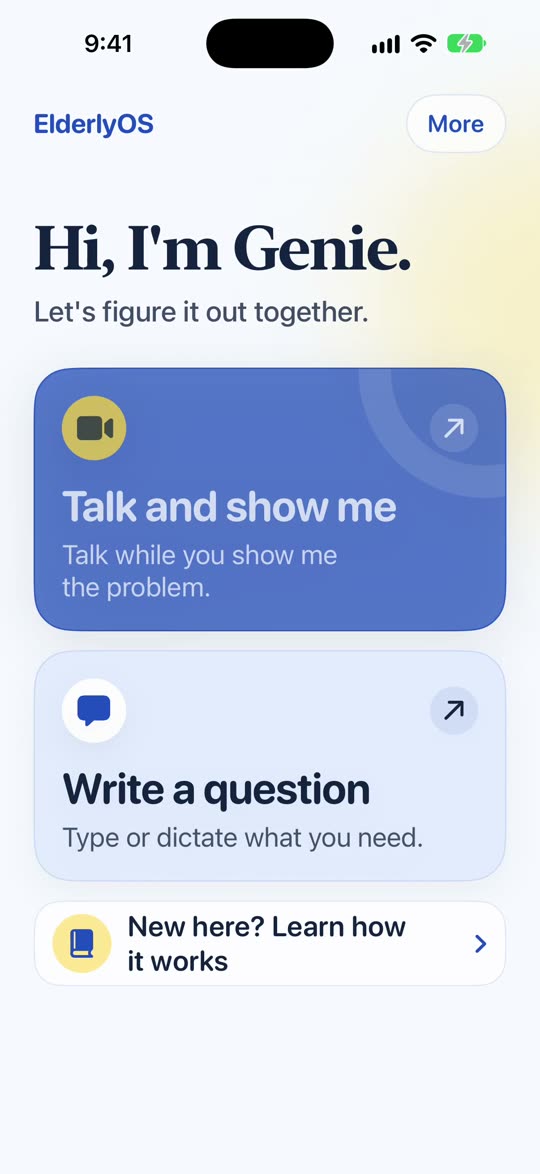
    The ElderlyOS home screen: Hi, I'm Genie. Let's figure it out together. Buttons for Talk and show me and Write a question.
    Two big buttonsTalk and show, or write. That's the whole home screen.

    How it works

    One

    Talk and show me

    They tap one button and talk, like a phone call. If the problem is a remote or a router, they point the camera at it and the assistant circles the part they need.

    Two

    Write to me

    Not everyone wants to talk out loud in a crowded room. They can type instead, and the assistant answers in words, with no sound at all.

    Three

    Ask for help

    When a job is risky or just hard, like a ladder or a gas fireplace, the assistant says so and helps them reach you, so they aren't guided through it alone.

    Not just for grandparents

    It works at work, too.

    The problem was never age. It's being handed something nobody explained. That happens on a job site as often as it does in a living room. A new hire stares at the label printer, a technician can't find the part number, a manager can't get the conference room screen to work.

    Point the camera

    Identify the part

    It reads the tag or the sticker, works out the exact model, and circles the piece you asked about.

    Look it up

    Find the right manual

    It searches the maker's own pages and tells you whether each one is your exact model or just close.

    Keep it

    Save how you did it

    Once you've figured something out, save the steps. The next person on the crew doesn't have to start over.

    Need it built around your job?

    We also build custom versions for teams: inspection checklists that fill themselves in from photos and video, answers that come from your own manuals and parts catalog first, and reports that land in the system you already use.

    Why we built it

    Picture the call. Your dad holds the phone too close to his face and says the TV "went blank." You spend half an hour on FaceTime working out that somebody pressed Input.

    We built ElderlyOS for our grandparents, so the next FaceTime call is an invitation to dinner instead of a tech-support call.

    An assistant that only gives help is half the job. The good version also helps people get help.

    Where the answers come from

    The assistant doesn't write steps from memory. It works out exactly what the device is, looks for the maker's own pages and for people who fixed the same problem, and shows what it found before it writes anything.

    • Each source is labeled: your exact model, the same series, or a similar one.
    • The lesson is built only from the sources they approve, with exact quotes and a note on where each one came from.
    • When it can't find a guide for the exact model, it says that out loud.

    What it isn't

    ElderlyOS doesn't replace Claude or ChatGPT, and we're not claiming a smarter AI or a cheaper one. It also doesn't replace family. It supports people. It doesn't stand in for the people in their lives.

    What we stand for

    • Easy first. If it isn't easy to use and easy to reach, it isn't done.
    • Honest help. Information has to be accurate and sourced. When we don't know, we say so.
    • Never alone. People are supported by us, by the assistant, or by their friends and family.
    • A nudge for the DIY-er. We encourage independence, and we make asking for help feel normal.
    • Respect for time and money. The assistant doesn't only give help. It helps people get help.

    Pricing

    Both plans are the whole app, with nothing held back. Subscriptions renew automatically until cancelled. Teams and custom builds are priced separately.

    Questions people ask

    Why not just use ChatGPT?

    You can. If your mom is comfortable with it, she probably should. ElderlyOS is for the person who isn't. It talks instead of asking her to type a good question, it looks at the remote through the camera, it finds the manual for the exact model, and it shows its sources before it writes a single step.

    Will it tell my dad to do something dangerous?

    No. For jobs where a wrong step could hurt someone, like gas, fire, wiring, or medicine, it doesn't write steps at all. It opens the maker's own instructions and videos and offers to help him ask someone.

    For jobs that are hard for some people but fine for others, like a ladder, it still helps, says it can be a challenge, and offers to message you.

    What happens to our conversations?

    Reminders, notes, and lessons are kept on the phone. The assistant is powered by Google's Gemini, so what's said during a conversation goes to Google to produce the answer. We don't keep transcripts on our servers. The privacy page has the full version.

    Does it need the internet?

    Yes. It looks things up and talks to the assistant, so it needs a connection. Wi-Fi is fine.

    What if it can't find a guide for my model?

    It says so. It labels each source as your exact model, the same series, or a similar one, and tells you when it's working from a similar one. It doesn't invent steps to fill the gap.

    Is it only for older people?

    No. We built it for our grandparents, but the problem isn't age. It's being handed something nobody explained. Plenty of people use it for the copier at work, a new car's screen, or a tool they've never held.

    Can you build a version for my business?

    Yes. Huntsville Software builds custom versions for teams, like inspection checklists filled in from photos, or answers that come from your own manuals first. Here's how that works.

    Can I buy it for my parents?

    Yes. You pay, and they get their own account. You can see that the plan is active, and nothing else: not their conversations, not their memories. They can end the arrangement any time. Gifts open at launch.

    Start with the thing that's been bugging you.

    Most of the time it's a remote, a router, or a phone setting, and it takes a few minutes. It's $30 a month, and you can cancel any time.